Tutorials · 13 min read
How to Remove the Background From an Image for Free (Phone, PC, Online)
Free ways to cut out a subject on iPhone, Mac, Windows, Android, PowerPoint and the web. You also get tips for keeping the result transparent and sharp.
By AIToolBase Editorial Team · Published
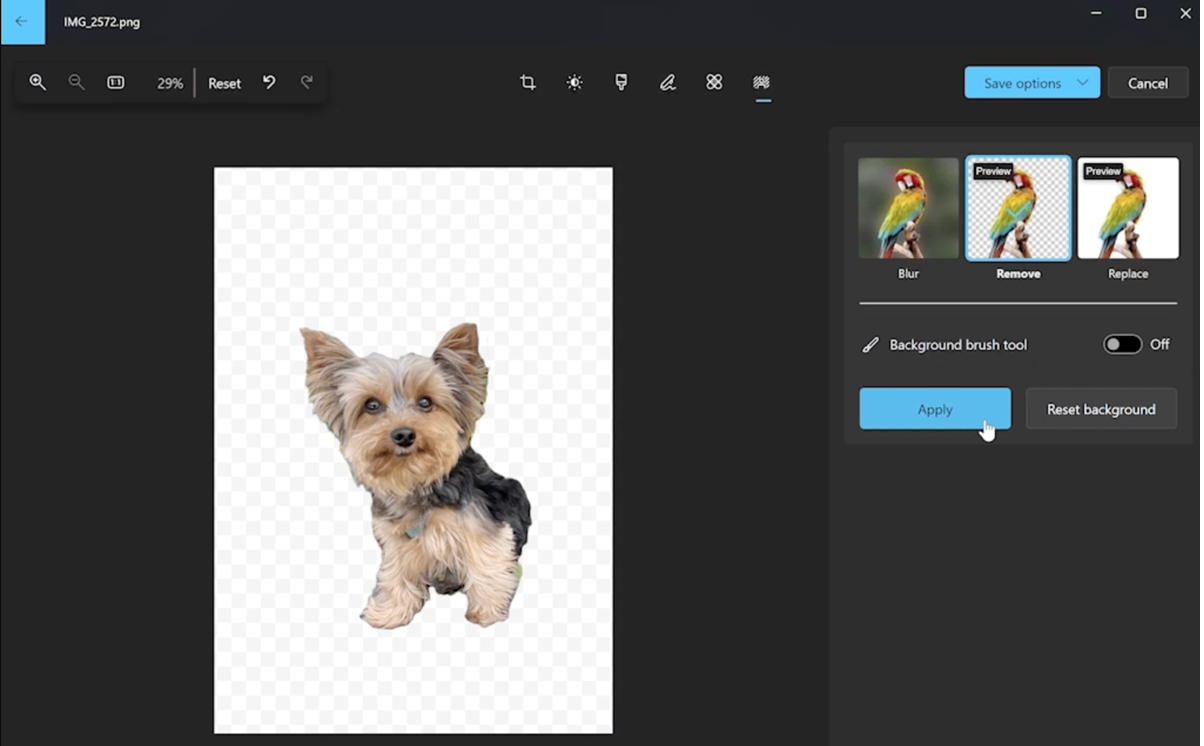
Short answer: You can usually remove a background for free with a tool that is already on your device, without uploading the photo to a website. On iPhone or iPad, touch and hold the subject in Photos, then tap Copy or Share. On a Mac, use Remove Background in Preview or the Finder's Quick Actions. On Windows 11, use the Remove background button in Paint or the background tool in Photos. On Android, press and hold the subject in Google Photos. For a transparent PNG from a browser, Adobe Firefly's background remover is free with an Adobe account. GIMP and the open-source rembg tool work offline.
This guide is for anyone who needs a cut-out for a slide, a product listing, a profile picture or a thumbnail. It covers built-in tools for each device, PowerPoint and Google Slides, free online removers, AI chat tools, and free desktop software. Features, labels and free limits were checked on the vendors' own pages on November 3, 2026.
Which free method to use
| Your situation | Quickest free option |
|---|---|
| Photo on an iPhone or iPad | Touch and hold the subject in Photos |
| Image on a Mac | Preview's Remove Background, or Finder Quick Actions |
| Image on a Windows 11 PC | Paint's Remove background button, or the Photos app |
| Photo on an Android phone | Press and hold the subject in Google Photos |
| Picture already in a slide | PowerPoint's Remove Background (if you have PowerPoint) |
| Any device, need a transparent PNG file | Adobe Firefly background remover (free Adobe account) |
| Many files, or private photos | rembg on your own computer |
Remove a background on iPhone or iPad
Apple calls this feature "lift a subject from the background" and documents it for iOS 16 and later. It works in Photos, Safari, Quick Look and other apps.
- Open the photo in full screen, or pause a video on a frame.
- Touch and hold the subject until an outline appears around it.
- Tap Copy (or Copy Subject) and paste the cut-out into a message, email, note or document. You can also tap Share, or tap Add Sticker to save it as a sticker.
Apple notes that the feature isn't supported on the iPad (8th generation). On iPadOS 26 and later, the Preview app on iPad also has a Remove Background command: open the image, tap the More button, then choose Remove Background.
Trevor Nace's short video shows the press-and-hold method in the iPhone Photos app.
Remove a background on a Mac
macOS has three built-in routes, all in apps that are already on your Mac.
- Preview: Open the image and click the Remove Background button. Apple's current guide (macOS Tahoe 26 and later) says Preview may ask to convert the file to PNG. Click Convert to change the original, or click Cancel and choose File > Duplicate to work on a copy. Edit > Undo reverses the change. Apple's guides for older macOS versions describe the manual Instant Alpha tool instead: drag over a background area of similar colour and press Delete.
- Finder: Control-click an image file, choose Quick Actions, click More, then choose Remove Background. If it is missing, choose Customize to turn on the Remove Background extension.
- Photos: Open a photo, Control-click it, and choose Copy Subject or Share Subject. You can then paste the subject into another app.
Remove a background on Windows 11
Two free Windows 11 apps have one-click background removal. If you don't see the buttons, update them from the Microsoft Store.
Paint: Open or paste the image. Then click the Remove background button in the Image group of the toolbar. To remove the background from only part of the picture, draw a rectangle with the selection tool first. Microsoft's announcement says the feature arrived in Paint version 11.2306.30.0. Save the result as a PNG so the transparent area stays transparent.
Photos: Open the photo, switch to editing mode, and choose the background tool. Then pick Blur, Remove or Replace, as the image at the top of this article shows. The Background brush tool lets you add or take away areas the AI got wrong. Click Apply, then save the image or copy it to the clipboard. Replace fills the background with a solid colour, which is handy when you need a plain white background.
Remove a background on Android
According to Google's help page, Google Photos can turn a photo's subject into a sticker on most Android devices that run the latest app update and have at least 4 GB of RAM.
- Open a photo in the Google Photos app. A shimmer effect outlines the subject.
- Press and hold the subject.
- Tap Copy to paste the cut-out into another app, or tap Share.
Google recommends photos where the subject is clearly in the foreground. The help page also notes that stickers can't be edited. Some phone makers' gallery apps have their own cut-out tools; check your manufacturer's help pages.
PowerPoint and Google Slides
PowerPoint has a manual background tool. It is part of PowerPoint for Microsoft 365, 2024 and 2021 on Windows and Mac. You need an Office licence, so it is only "free" if you already have one.
- Select the picture, then choose Picture Format > Remove Background.
- PowerPoint colours the area it will delete in magenta.
- Use Mark Areas to Keep or Mark Areas to Remove to draw over any mistakes.
- Click Keep Changes. To export the result, right-click the picture and choose Save as Picture.
This doesn't work on vector files such as SVG, AI, WMF and DRW. For those, the button is greyed out.
Google Slides has a Remove background option: click the image, then choose Edit image > Remove background. You can also use Format > Image > Edit image. However, Google's help page says the feature requires an eligible Google Workspace or Google AI plan, so many free personal accounts won't see it. A removed background can't be reversed with Reset image; use Undo or the version history instead. On a free account, remove the background with one of the tools in this guide, then insert the PNG into your slide.
Free online background removers
Online tools work on any device, but you upload your photo to someone else's server. Before you upload faces, IDs or client work, read the tool's privacy policy.
Adobe Firefly. Adobe's free background remover page, the link that used to lead to Adobe Express, now shows Adobe Firefly's remover. Adobe says you can remove backgrounds for free with an Adobe account. Files must be JPG, PNG or WebP up to 50 MB, and the result downloads as a PNG with a transparent background. Free users get a daily allowance of generations that also covers background removal; a paid plan removes the limit. Adobe's page doesn't explain how uploads are stored. It points to Adobe's Terms of Use and Privacy Policy.
remove.bg. This is the classic "no sign-up" option, but it is closing. remove.bg says its standalone website will no longer be available from 1 December 2026 at 9:00am CET. Background removal is moving to Canva, and API access is moving to Leonardo.ai. Until then, the free download is a preview image of up to 0.25 megapixels. Full-resolution "HD" downloads of up to 50 megapixels cost credits, and new accounts get 1 free credit. The site accepts JPG, PNG and WebP files up to 22 MB, and it says uploaded files are discarded automatically after 60 minutes.
Canva. Canva has a Background Remover inside its editor, and remove.bg says it uses the same technology. Canva's website blocked our automated checks, so we couldn't confirm whether the free plan includes it. Check Canva's pricing page before you rely on it.
Photoroom. Photoroom says you can "get started for free" removing backgrounds, and upgrade for more AI tools and high-resolution exports. Downloads are PNG, JPEG or WebP. Paid plans start at $7.50 a month billed yearly, as of November 2026. Check the free export size and any watermark rules in the app.
Using ChatGPT or Gemini
AI chat assistants can also edit an uploaded photo. You might type, for example, "remove the background and put the subject on plain white". TheFigCo's video shows this approach with AI chat tools such as ChatGPT.
- Gemini: Google's help page says you must be signed in and 18 or over to edit images. Without a Google AI plan, edited images download at 1K resolution, or at 2K with a plan. Google has said that images created or edited with its native image generation carry an invisible SynthID watermark.
- ChatGPT: You can attach a photo on any plan. OpenAI's own pages disagree on whether the Free plan includes image creation, and they didn't load for our checks. Check chatgpt.com/pricing for current limits. Our guide on how to use ChatGPT covers uploads and plans.
In our view, these tools are better for a new background than for a precise cut-out. The image model draws a new picture instead of only deleting pixels, so check faces, text and logos carefully. Neither help page promises a transparent PNG, so check the downloaded file. Clear prompts help a lot; see our tips on writing better prompts.
Free desktop and open-source options
GIMP is free and runs offline on Windows, macOS and Linux.
- Choose Layer > Transparency > Add Alpha Channel so that deleted pixels become transparent.
- For a plain or white background, use Tools > Selection Tools > Fuzzy Select (shortcut U) and click the background. The GIMP manual says this tool works best on objects with sharp edges.
- For people, pets or busy scenes, use Tools > Selection Tools > Foreground Select. Roughly outline the subject, press Enter, then paint over the parts you want to keep and click Select.
- Invert the selection if needed, press Delete, and export the result as PNG.
The manual warns that Foreground Select needs a lot of memory and can slow down or crash on large images.
rembg is an open-source command-line tool and Python library for removing backgrounds, released under the MIT licence. It runs on your own computer, so your photos stay local unless you choose one of its optional cloud backends. It needs Python 3.11 to 3.13.
pip install "rembg[cpu,cli]"
rembg i photo.jpg photo-cutout.png     # one image
rembg p input-folder output-folder     # a whole folder
rembg i -a photo.jpg photo-cutout.png  # alpha matting for softer edges
One licence detail matters: each model has its own licence, separate from rembg's MIT licence. The default model, BRIA RMBG-2.0 (about 1 GB), needs a paid agreement for commercial use. For business work, check the licence or pick another model with -m, such as -m u2net, which the README describes as smaller and faster, with blockier edges.
If you already run image models locally, a node-based tool such as ComfyUI can also run background-removal models as one step in a larger workflow. Browse more options in our image models category.
Comparison of free background removal methods
| Method | Device | Cost | Sign-up | Upload needed | Output notes (documented) |
|---|---|---|---|---|---|
| Lift subject (Photos) | iPhone, iPad | Free | No | No | Copy, share or sticker; not on iPad (8th gen) |
| Preview / Finder / Photos | Mac | Free | No | No | Preview may convert the file to PNG |
| Paint / Photos | Windows 11 | Free | No | No | Save as PNG to keep transparency |
| Google Photos stickers | Android | Free | Google account | No separate upload | Needs 4 GB RAM; copy or share |
| PowerPoint Remove Background | Windows, Mac | Needs Office licence | Microsoft account | No | Manual keep/remove marks; no vector files |
| Google Slides Remove background | Browser | Eligible paid plan | Yes | Yes | Can't be reset with Reset image |
| Adobe Firefly remover | Browser | Free daily allowance | Adobe account | Yes | Transparent PNG; JPG, PNG, WebP up to 50 MB |
| remove.bg (until 1 Dec 2026) | Browser | Free preview | No for preview | Yes | Free preview up to 0.25 MP; HD needs credits |
| Photoroom | Browser, mobile | Free start, paid plans | Yes | Yes | High-res exports on paid plans |
| Gemini | Browser, mobile | Free with limits | Yes, 18+ | Yes | 1K download without an AI plan |
| GIMP | Windows, Mac, Linux | Free | No | No | Manual; full resolution; export PNG |
| rembg | Windows, Mac, Linux | Free (MIT) | No | No | Batch folders; check model licence |
Tips for clean edges and high quality
- Save as PNG or WebP, not JPG. JPG has no transparency, so the removed area turns into a solid colour, usually white or black. PNG and WebP keep the alpha channel.
- Keep the resolution. "Without losing quality" mostly means using a tool that exports at full size. Built-in device tools, GIMP and rembg work on your original file. remove.bg's free preview is capped at 0.25 megapixels, and Gemini downloads at 1K without a plan. Start from the largest original you have, not a screenshot or a messaging-app copy.
- Hair and fur. Automatic tools struggle most with fine strands. Use the refine tools where you have them: Mark Areas to Keep in PowerPoint, the Background brush tool in Windows Photos, Foreground Select in GIMP, or rembg's
-aalpha matting. Shoot against a plain background that contrasts with the hair colour. - White backgrounds. Removing a plain white background is the easy case. Fuzzy Select in GIMP or Instant Alpha in older macOS Preview handle it well. If you need a white background, Replace in Windows Photos fills one in.
- Product photos. Use even lighting, a plain backdrop and a sharp focus. Check your marketplace's image rules, and review every batch result, because one bad mask can cut off part of a product.
For other projects, see our guides on making YouTube thumbnails with AI and creating AI images for free.
Frequently Asked Questions
How do I remove the background from an image for free online with no sign-up?
Until 1 December 2026, remove.bg gives a free preview download of up to 0.25 megapixels without an account. Adobe Firefly's free remover needs a free Adobe account. For no sign-up and no upload at all, use your device's built-in tool.
How do I remove the background from an image on iPhone?
Open the photo in Photos, touch and hold the subject until an outline appears, then tap Copy, Share or Add Sticker. Apple's guide lists this feature from iOS 16 onwards.
How do I remove the background from an image in PowerPoint?
Select the picture, choose Picture Format > Remove Background, and adjust the result with Mark Areas to Keep or Mark Areas to Remove. Then click Keep Changes, and use Save as Picture to export the image.
Can I remove the background from an image in Google Slides?
Yes, through Edit image > Remove background. Google says it needs an eligible Google Workspace or Google AI plan, though. On a free account, remove the background elsewhere and insert the PNG.
Is Canva's background remover free?
We couldn't confirm it, because Canva's pages blocked our automated checks. Check Canva's pricing page for whether your plan includes Background Remover.
How can I remove a background in Photoshop, GIMP or Procreate for free?
Photoshop is paid software; GIMP is the free alternative, with Fuzzy Select for plain backgrounds and Foreground Select for complex ones. On iPad, lift the subject in Photos first and paste it into a drawing app such as Procreate.
How do I remove a background without losing quality?
Use a tool that exports at the original resolution, such as GIMP, rembg or a built-in device tool, and save as PNG. Free previews and screenshots reduce resolution.
How do I remove a white background from an image for free?
Click the white area with GIMP's Fuzzy Select and delete it, or use the one-click tools in Paint, Preview or Photos. Save the result as PNG so the white area becomes transparent.
Sources
- Apple Support, Lift a subject from the photo or video background on iPhone
- Apple Support, Lift a subject from the photo or video background on iPad and Remove the background from an image in Preview on iPad
- Apple Support, Remove a background or extract an image in Preview on Mac
- Apple Support, Perform quick actions in the Finder on Mac
- Apple Support, Isolate and share a photo's subject on Mac
- Windows Insider Blog, Background Removal in Paint begins rolling out to Windows Insiders
- Windows Insider Blog, Windows Photos gets background remove and replace
- Google Photos Help, Create stickers from your photos (Android)
- Microsoft Support, Remove the background of a picture
- Google Docs Editors Help, Remove image backgrounds in Google Drawings, Slides & Vids
- Adobe, Free image background remover
- remove.bg, Pricing and remove.bg is moving to Canva
- Photoroom, Background Remover and Pricing
- Gemini Apps Help, Generate & edit images with Gemini Apps
- Google, Upload and edit your images directly in the Gemini app
- GIMP Documentation, Foreground Select, Fuzzy Select and Add Alpha Channel
- GitHub, danielgatis/rembg
Reviewed on November 3, 2026. remove.bg's standalone site is scheduled to close on December 1, 2026. Free allowances for Adobe Firefly, Canva, Photoroom, ChatGPT and Gemini, and menu labels in Apple, Microsoft and Google apps, can change with updates.